
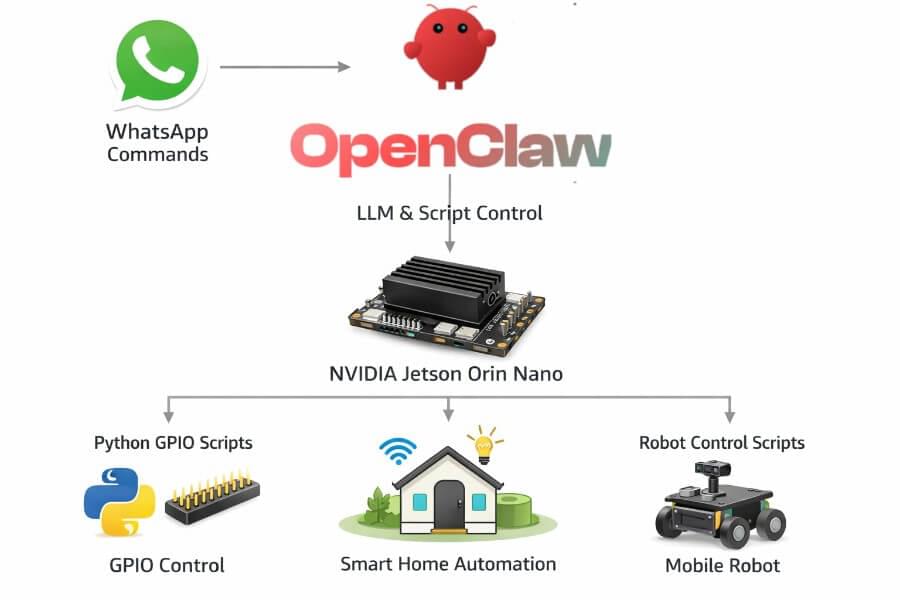
This guide explains how to install OpenClaw on a NVIDIA Jetson Orin Nano, and how to extend it into a real Physical AI agent capable of interacting with the physical world. The computational power of the Jetson Orin Nano enables advanced physical AI models to operate in real time.
Running an AI agent locally is interesting.
Running an artificial intelligence (AI) agent that can:
Understand natural language
Be controlled via WhatsApp
Execute Python scripts
Trigger GPIO pins
Control relays, LEDs, motors
Command a mobile robot
Complete tasks autonomously
That’s something else.
OpenClaw is an AI solution designed to enable advanced artificial intelligence capabilities in physical systems, allowing agents to complete tasks autonomously in real-world environments.
Physical AI lets autonomous systems perceive, understand, reason, and perform complex actions in the physical world. This underpins the paradigm shift from traditional AI systems that operate purely in digital environments to intelligent systems that can perceive, understand, and act in the physical world.
What Is OpenClaw?
OpenClaw is an open-source, autonomous AI agent framework that:
Connects to messaging platforms (WhatsApp, Telegram, Slack, Discord, etc.)
Interfaces with LLM backends
Executes tools and local scripts
Runs fully self-hosted, offering data sovereignty by keeping sensitive information under user control
Facilitates business processes such as scheduling, email management, and workflow automation
Can be deployed as part of multi agent systems, coordinating with other agents for complex workflows
OpenClaw can represent different agent types depending on its configuration and skills, such as personal assistants, workflow managers, or monitoring agents.
It does not directly manage hardware.
It orchestrates actions. In OpenClaw, AI agents work by defining roles, personalities, communication styles, and utilizing specific tools or instructions to perform their functions.
That distinction is key.
OpenClaw can be securely deployed on local machines or private servers, and supports deployment strategies for multi agent systems.
Why Jetson Orin Nano?
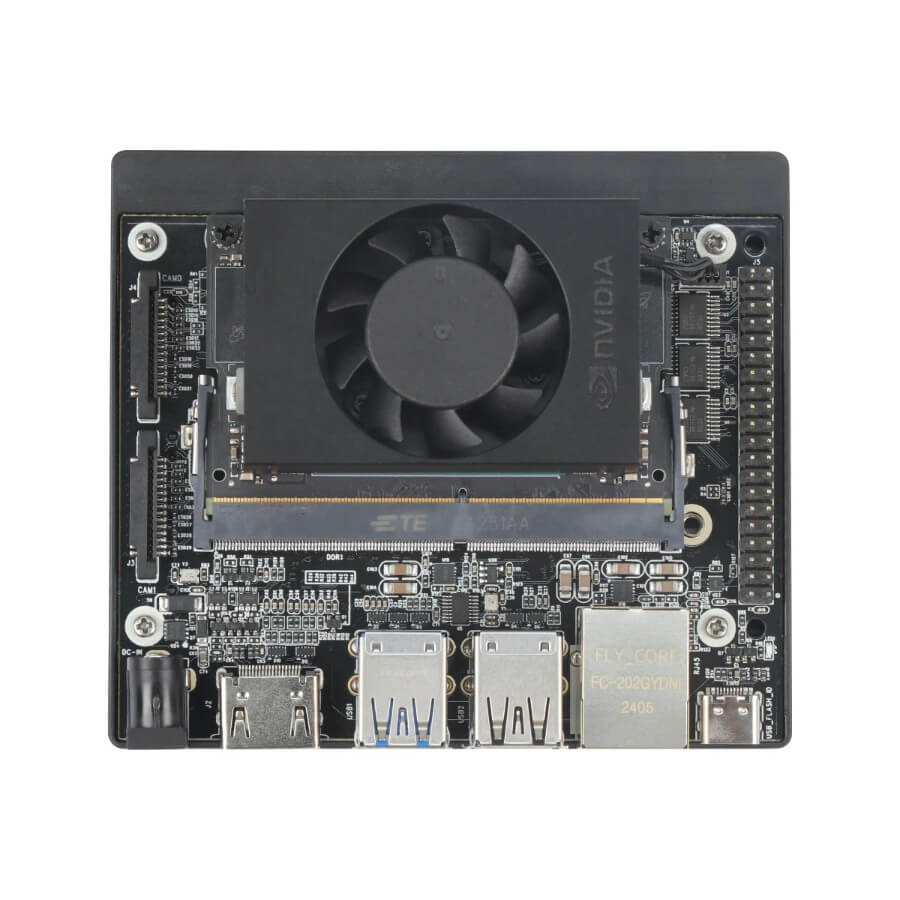
The NVIDIA Jetson Orin Nano is ideal for this setup because it provides:
ARM64 Ubuntu (JetPack)
CUDA acceleration (for local LLMs)
40-pin GPIO header
USB / CSI camera support
Low power consumption
Edge-AI performance (~67 TOPS on the Super version)
The NVIDIA Jetson Orin Nano Super Developer Kit delivers up to 67 TOPS of AI performance, a 1.7X improvement over its predecessor. It features an Ampere GPU and a 6-core ARM CPU, enabling multiple concurrent AI application pipelines and high-performance inference for a significant performance boost. Users can unlock enhanced AI performance and new generative AI capabilities with just a software upgrade—no hardware changes required. The developer kit includes a reference carrier board that supports all Orin Nano and Orin NX modules, making it ideal for prototyping edge AI products.
The Jetson Orin Nano runs the NVIDIA AI software stack, including frameworks like NVIDIA Isaac for robotics and NVIDIA Metropolis for vision AI. It also supports synthetic data generation through NVIDIA Omniverse Replicator, helping train AI models. The Jetson Orin Nano Super Developer Kit redefines generative AI by making it accessible for developers, students, and makers at the edge. It is a compact, powerful computer for running generative AI models on small edge devices.
It’s not a Raspberry Pi.
It’s a compact AI workstation with hardware interfaces.
Architecture Overview of Physical AI Systems
Before installation, understand the architecture:
1 |
|
OpenClaw decides what to do. Python decides how to do it.
OpenClaw is designed to operate across both physical and digital environments. Training and testing of agents often occur in virtual spaces or simulated environments before real-world deployment, allowing for safe, controlled experimentation. Digital twins can be used to create high-fidelity virtual models of physical systems, enabling detailed testing and optimization within these digital environments. The architecture supports multi agent systems, allowing multiple agents to coordinate and achieve simultaneous execution of tasks for greater efficiency. Simulation environments provide a risk-free setting for training autonomous systems, and the use of world foundation models (WFM) is increasingly common to generate realistic, physics-aware scenarios for robust training.
Understanding AI Models
AI models are the core of any physical AI system. They enable machines to interpret sensor data, recognize objects, and understand spatial relationships in the physical world. Generative AI models, especially large language models (LLMs), have redefined what’s possible—allowing physical AI agents to process human language, generate responses, and even create synthetic data for training. These models are trained on massive datasets, including real world sensor data, images, and videos, so they can identify patterns and make predictions.
In physical AI systems, the choice and training of AI models directly impact how well an agent can perceive and interact with its environment. For example, vision language models help robots understand both what they see and what they’re told to do. By leveraging generative AI and large language models, developers can build physical AI agents that are more adaptable, intelligent, and capable of operating in complex environments. Understanding how these AI models work—and how to apply them—is essential for anyone building or deploying physical AI systems.
Step 1 — Prepare Jetson Orin Nano
Install latest JetPack (6.x recommended) to ensure your Jetson Orin Nano has the necessary computational power for running advanced AI models and physical AI workloads.
Then:
1 | sudo apt update && sudo apt upgrade -y |
Make sure Node 22+ is installed:
1 | curl -fsSL https://deb.nodesource.com/setup_22.x | sudo -E bash - |
Jetson is ARM64 — so always verify compatibility.
Step 2 — Install OpenClaw
1 | sudo npm install -g openclaw@latest |
Create a dedicated runtime directory:
1 | sudo mkdir -p /opt/openclaw |
Start the gateway:
1 | openclaw gateway |
You now have the orchestration layer running locally.
Step 3 — Install a Local Large Language Models Backend (Recommended)
OpenClaw needs a model.
On Jetson, the cleanest approach is:
Install Ollama
1 | curl -fsSL https://ollama.com/install.sh | sh |
Pull a model optimized for edge:
1 | ollama pull qwen2.5:7b |
Start Ollama:
1 | ollama serve |
OpenClaw can now connect to:
1 | http://localhost:11434 |
You now have a fully local AI stack.
No cloud required.
Step 4 — Enabling GPIO on Jetson
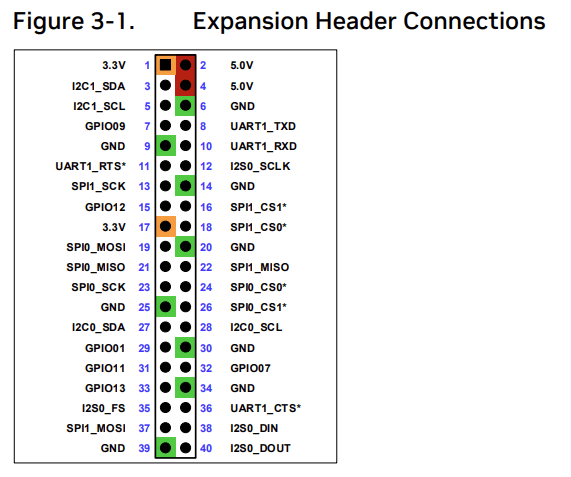
Jetson uses a Raspberry-Pi-style 40-pin header.
Install GPIO Python library:
1 | sudo apt install python3-jetson-gpio |
Add user to gpio group:
1 | sudo usermod -aG gpio $USER |
Reboot.
Step 5 — Create Python Scripts for Physical Actions
OpenClaw will execute these scripts.
Example: turn relay ON (pin 18)
1 | # relay_on.py |
Physical AI combines AI models with sensors, actuators, and control systems to interact with the real world. These systems often rely on multimodal inputs such as images, videos, speech, and sensor data to understand and respond to their environment, enabling autonomous actions and real-time decision-making in complex settings. Training physical AI models requires large, diverse, and physically accurate data about spatial relationships and the physical rules governing the real world.
Make executable:
1 | chmod +x relay_on.py |
Test manually:
1 | python3 relay_on.py |
If your relay clicks — hardware layer works.
Step 6 — Connect OpenClaw AI Agents to Scripts
In OpenClaw tool configuration, define a tool like:
1 | Name: turn_light_on |
Now the LLM can decide:
“Turn on the living room light”
And OpenClaw will execute the Python script.
This is how you bridge AI to physical hardware.
Decision Making in Physical AI Agents
Physical AI agents don’t just sense the world—they act on it. Decision making is at the heart of how these agents work. By analyzing sensor data from cameras, microphones, and other inputs, AI agents use machine learning and reinforcement learning algorithms to decide what to do next. This could mean anything from moving a robotic arm to completing complex tasks like navigating a warehouse or responding to spoken commands.
Advanced AI capabilities, such as natural language processing and computer vision, allow physical AI agents to interpret instructions, understand their surroundings, and make informed choices. In dynamic environments, these agents must constantly adapt, using past interactions and real-time data to improve their performance. The result: AI agents that can perform tasks autonomously, interact with other agents, and operate safely and efficiently in the physical world.
Real Use Cases
AI Home Controller
WhatsApp message: “Turn off kitchen lights”
OpenClaw parses intent
Executes Python script
GPIO triggers relay
Lights go off
Fully local. No cloud dependency.
AI Robot Controlled via WhatsApp
WhatsApp: “Come to the kitchen”
OpenClaw calls robot control script
Script interfaces with motor driver (PWM)
Robot moves
You can integrate:
ROS2 nodes
Serial Arduino bridge
I2C motor drivers
Camera inference
OpenClaw becomes the natural language interface.
OpenClaw can also be used to control autonomous agents and autonomous machines, such as robots and self driving cars, which are examples of autonomous systems operating in the real world. Reinforcement learning is often used to train these autonomous machines in simulated environments before deployment, enabling them to learn decision-making behaviors and adapt to complex scenarios. The development of autonomous systems is accelerated by integrating AI technologies that support real-time decision-making and interaction with the physical world. Training physical AI typically involves simulation and synthetic data to prepare agents for real-world tasks.
Autonomous Smart Automation
Example:
Temperature sensor reads > 30°C
Python service notifies OpenClaw
OpenClaw decides to turn on fan
GPIO triggers cooling relay
You now have a closed-loop Physical AI system.
Physical AI systems often require immediate responses for critical applications, where even milliseconds matter. Data collection for physical AI is a time-consuming process that involves robots or sensors continuously interacting with their environments to gather high-quality, diverse data essential for effective training and deployment.
Benefits of Physical AI
Physical AI brings a new level of efficiency and productivity to real world applications. By automating repetitive tasks, physical AI systems free up human workers for more creative and strategic work. In environments where safety is critical—like manufacturing floors or hazardous sites—physical AI can reduce the risk of human error and keep people out of harm’s way.
Autonomous vehicles are a prime example, using physical AI to navigate roads, avoid obstacles, and make split-second decisions. In smart homes and businesses, physical AI agents can manage lighting, climate, and security, all without human intervention. The result is not just convenience, but also a significant boost in operational efficiency and customer experience. As physical AI continues to evolve, it will drive innovation across industries, enabling new products, services, and business models that were once out of reach.
Challenges of Physical AI
Building robust physical AI systems isn’t without its hurdles. One major challenge is the need for vast amounts of high-quality sensor data to train AI models. Collecting, labeling, and processing this data can be resource-intensive. Integrating multiple AI systems—each with its own software and hardware requirements—adds another layer of complexity, especially when combining vision, language, and control modules.
Security concerns are also front and center. Physical AI systems are often connected to networks and external devices, making them potential targets for cyber attacks or data breaches. Ensuring the safety and reliability of these systems requires rigorous testing, secure coding practices, and ongoing monitoring. Developers must prioritize data quality, seamless integration, and robust security to ensure that physical AI delivers on its promise without introducing new risks.
Best Practices for Physical AI
To get the most out of physical AI systems, developers should follow a few key best practices. First, always prioritize human oversight and feedback—no matter how advanced the AI, human intervention is essential for safety and reliability. Leveraging pre-built AI agents and developer tools can accelerate development, reduce costs, and ensure compatibility with a broad AI software ecosystem.
Transparency and explainability are also critical. Understanding how AI agents make decisions helps identify potential biases, errors, or unexpected behaviors. Documenting system architecture and decision logic makes it easier to troubleshoot and improve AI performance over time. By focusing on these best practices, developers can build physical AI systems that are not only powerful and efficient, but also trustworthy and aligned with human values.
Security Considerations
OpenClaw executes system commands.
That means:
Run as dedicated user
Avoid root execution
Restrict accessible scripts
Use firewall rules
Avoid exposing ports publicly
This is powerful software. Treat it like infrastructure.
Why This Architecture Is Powerful
Most AI assistants stop at:
“Here is your answer.”
This architecture continues:
“Here is the action.”
OpenClaw is not replacing ROS.
Not replacing microcontrollers.
Not replacing hardware drivers.
It sits above them.
It is the decision layer.
Final Thoughts
Running OpenClaw on NVIDIA Jetson Orin Nano transforms it into:
A local AI assistant
A WhatsApp-controlled automation system
A physical AI orchestrator
A robotics command interface
A privacy-first home AI server
It’s not just a chatbot.
It’s an AI that can move, switch, open, close, activate.
That’s when AI becomes physical.