
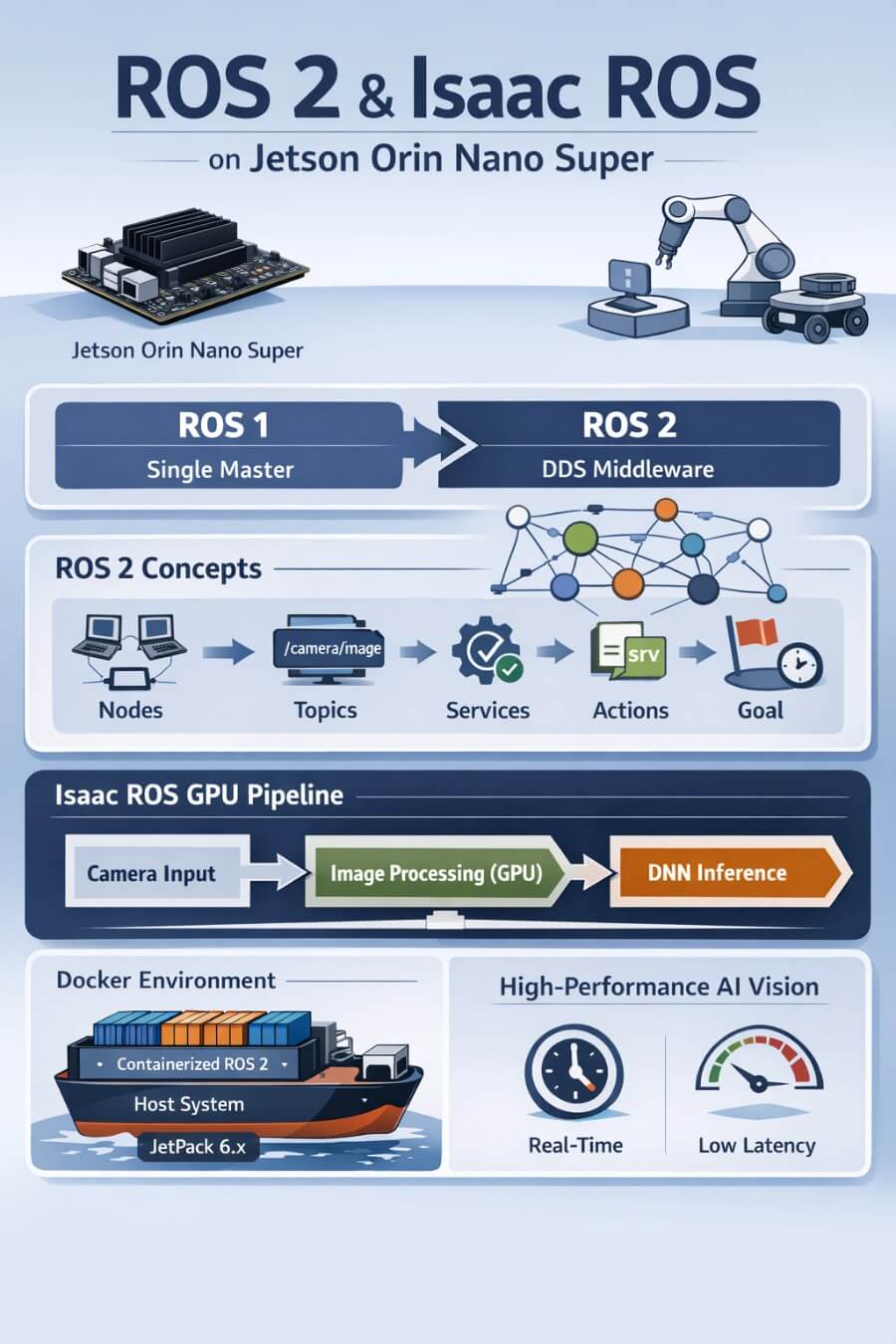
A deliberately long, deeply technical, experience‑driven guide. Written both for my future self (who will have forgotten all the painful details) and for readers who want to install and actually understand ROS 2 + Isaac ROS on Jetson Orin Nano Super — without wasting weeks on unclear or misleading documentation.
The Jetson Orin Nano Super Developer Kit is designed for advanced robotics and AI projects. As an embedded system, it offers high performance and energy efficiency, making it suitable for deploying AI workloads and robotic applications at the edge. Its relevance for embedded systems in robotic and AI hardware is significant, as it enables portable, efficient, and embedded computing solutions for deploying AI and robotics frameworks.
1. Why this article exists (and why it is long on purpose)
This guide is not theoretical. It is based on real experiments, real dead‑ends, and real fixes on the following platform:
NVIDIA Jetson Orin Nano Super
JetPack 6.x
Ubuntu 22.04 (Jammy)
ROS 2 Humble Hawksbill
Isaac ROS 3.x (release‑3.2)
The Jetson Orin Nano Super Developer Kit is a powerful, affordable embedded computer and an ideal platform for AI and robotics development. As an embedded system, it offers high performance and energy efficiency, making it suitable for deploying AI workloads and robotic applications at the edge. Priced at $249, it is accessible for developers, students, and makers. The kit supports a wide range of AI and robotics frameworks, providing hands-on experience with cutting-edge technology.
If you are using different versions, do not assume this guide applies unchanged.
2. A concrete history of ROS
2.1 ROS is not an operating system
Despite its name, ROS (Robot Operating System) is not an operating system.
ROS is a middleware and software ecosystem designed to solve a fundamental robotics problem:
How do you build complex robotic systems as composable, distributed software, without rewriting everything for each robot?
Before ROS, robotics software was typically:
monolithic
tightly coupled to hardware
difficult to reuse
nearly impossible to debug at runtime
ROS introduced a radical shift:
robots are graphs of small programs
programs communicate through messages, not function calls
hardware, perception, planning, and control are decoupled
This architectural idea remains the core of ROS today.
2.2 Why ROS 1 eventually hit a wall
ROS 1 was extremely successful in research and prototyping, but it had fundamental architectural limitations:
Single master: a single point of failure
No real‑time guarantees
No security model (everything trusted everything)
Poor embedded and industrial support
As robotics moved toward:
multi‑robot systems
autonomous vehicles
safety‑critical applications
these limitations became blockers rather than inconveniences.
2.3 ROS 2 is a redesign, not an upgrade
ROS 2 is not “ROS 1 with improvements”. It is a ground‑up redesign.
The most important design decision:
ROS 2 is built on DDS (Data Distribution Service).
DDS is a mature, industry‑grade middleware used in:
aerospace
defense
industrial automation
This single decision gives ROS 2:
decentralized discovery (no master)
configurable QoS (latency vs reliability)
real‑time compatibility
security primitives
Everything else in ROS 2 follows from this choice.
3. Core ROS 2 concepts (deep, practical explanations)
Understanding Isaac ROS requires a solid mental model of ROS 2 primitives.
3.1 Nodes
A node is a single process that performs a well‑defined responsibility.
Examples:
camera driver
SLAM algorithm
speech recognizer
motor controller
Why nodes matter:
enforce separation of concerns
can be restarted independently
scale from one machine to many
ROS 2 also supports composable nodes, allowing multiple nodes to share a process when performance matters.
3.2 Topics
A topic is an asynchronous, many‑to‑many communication channel.
Key properties:
publishers do not know subscribers
subscribers do not know publishers
communication is continuous
Typical use cases:
sensor streams (/camera/image_raw)
localization estimates
telemetry
Topics are ideal for high‑frequency data.
3.3 Services
A service is synchronous request/response communication.
Use services when:
you need an immediate answer
the operation is short
Examples:
reset a component
query system state
Services block the caller until a response arrives.
3.4 Actions
An action is used for long‑running, cancellable tasks.
Actions combine:
a goal
continuous feedback
a final result
Examples:
navigation to a pose
speech synthesis
manipulation tasks
Actions are essential for realistic robotic workflows.
3.5 The ROS 2 computation graph
At runtime, a robot is a dynamic graph of nodes connected by topics, services, and actions.
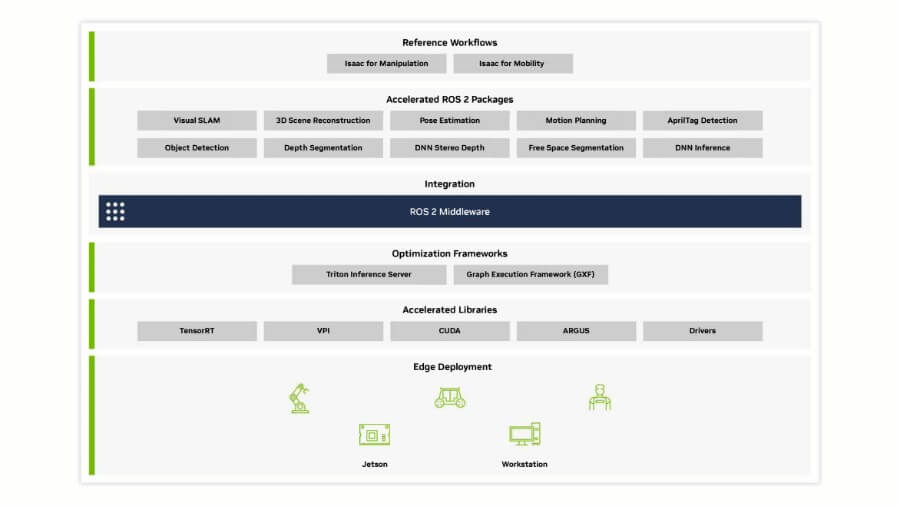
This graph is introspectable at runtime, which is one of ROS’s greatest strengths. ROS 2 graphs using NVIDIA-accelerated Isaac ROS packages can significantly increase performance, leveraging NVIDIA accelerated technologies for high efficiency and low latency in robotics applications.
4. Why Isaac ROS exists
4.1 The performance gap in vanilla ROS 2
ROS 2 deliberately avoids assumptions about hardware acceleration.
This flexibility comes at a cost:
GPU acceleration is manual
zero‑copy transport is not guaranteed
CPU ↔ GPU transfers are common
On NVIDIA Jetson devices, this leads to:
unnecessary latency
wasted power
poor utilization of the GPU
4.2 Isaac ROS philosophy
Isaac ROS is NVIDIA’s answer to this gap.
It is:
a collection of ROS 2 packages
optimized specifically for NVIDIA hardware
designed for GPU‑first dataflow
Isaac ROS offers modular packages for robotic perception and easy integration into existing ROS 2-based applications. NVIDIA Isaac ROS also includes packages for computer vision, image processing, and robust object detection, enabling advanced vision AI applications that process and analyze visual data from sensors, IoT devices, and cameras. It includes the NVIDIA implementation of type adaption and negotiation called NITROS, which are ROS processing pipelines made up of hardware-accelerated modules. Isaac ROS supports a rich collection of individual ROS packages optimized for NVIDIA GPUs and Jetson platforms, helping to reduce development times. Specific packages and tools are available for localization and mapping, such as the Visual SLAM package, which provides a high-performance ROS 2 package for VSLAM. For motion planning, the cuMotion library enables solving robot motion planning problems at scale. Isaac ROS also allows for the development of robotic applications using NVIDIA AI and pretrained models from robotics-specific datasets.
Core ideas:
NITROS: type‑adapted, zero‑copy transport
CUDA and TensorRT where it matters
predictable latency on embedded devices
Isaac ROS does not replace ROS 2. It extends it where performance is critical.
5. Jetson Orin Nano Super: hardware constraints matter
The Jetson Orin Nano Super is a powerful computer and an embedded system designed for generative AI applications, including vision transformers and large language models. It is:
ARM64 (aarch64)
an integrated GPU (no discrete RTX cores)
limited RAM compared to desktops
The device supports Linux-based software, as detailed in the NVIDIA Jetson Linux Developer Guide. To ensure compatibility and optimal performance, it is important to download the correct software, firmware, and drivers from official sources.
Implications:
x86 tutorials often do not apply
Isaac Sim does not run locally
version mismatches are unforgiving
Many problems disappear once these constraints are accepted early.
6. The critical compatibility matrix (do not skip this)
This table determines whether your setup works or fails. This is my current configuration.
| Component | Version |
|---|---|
| JetPack | 6.x |
| Ubuntu | 22.04 (Jammy) |
| ROS 2 | Humble Hawksbill |
| Isaac ROS | 3.x (release‑3.2) |
| Architecture | ARM64 (aarch64) |
| Isaac ROS and Jetson Orin Nano Super are part of a broader ecosystem that includes other NVIDIA platforms, enhancing performance and compatibility across a range of NVIDIA hardware and software environments. |
Important notes:
Isaac ROS versions based on ROS 2 Jazzy target x86 / Jetson Thor, not Orin Nano.
Following “latest” NVIDIA documentation blindly will break your system.
7. Why Isaac ROS uses Docker (and why this is correct)
7.1 The native installation trap
Installing everything natively means juggling:
CUDA versions
TensorRT versions
ROS dependencies
system libraries
One incorrect upgrade can silently break the entire stack.
7.2 The container‑based solution
Isaac ROS provides pre‑built Docker images containing:
ROS 2 Humble
CUDA
TensorRT
correct driver integration
This provides:
reproducibility
isolation
predictable performance
On Jetson, Docker is not optional for Isaac ROS.
8. Installing Isaac ROS (commands that actually worked)
8.1 Workspace creation
1 | mkdir -p ~/isaac_ros_ws/src |
8.2 Launching the development container
1 | cd ~/isaac_ros_ws/src/isaac_ros_common |
This script is the single entry point to Isaac ROS on Jetson.
9. The run_dev.sh script (representative, annotated)
⚠️ Disclaimer: this is a representative version illustrating structure and intent. Replace it with your exact version when publishing.
1 | #!/usr/bin/env bash |
Every line exists to guarantee GPU access, ROS discovery, and data persistence.
10. Persistence across reboots
All work under:
1 | /workspaces/isaac_ros-dev |
is mounted from the host filesystem.
Containers are ephemeral. Your work is not.
11. Automating startup after reboot
Create a helper script:
1 | nano ~/start_isaac_ros.sh |
1 | #!/usr/bin/env bash |
1 | chmod +x ~/start_isaac_ros.sh |
12. AI performance optimization on Jetson Orin Nano Super
The Jetson Orin Nano Super Developer Kit marks a new era for embedded AI, delivering a massive leap in performance for robotics and edge AI applications. With up to 67 TOPS of AI performance, this compact powerhouse redefines generative AI at the edge—making it possible to run advanced generative AI models, vision transformers, large language models, and vision-language models directly on small edge devices.
What sets the Orin Nano Super apart? For many users, unlocking this performance boost is just a software upgrade—no new hardware required. This means existing developers, students, and makers can immediately take advantage of the latest generative AI capabilities, bug fixes, and performance enhancements by downloading the latest software upgrade. The result: a future-proof, accessible platform that keeps pace with the rapidly evolving AI landscape. These improvements open up new possibilities for developers, students, and makers to explore innovative AI and robotics applications.
13. Simulation and testing for robotics workflows
Simulation and testing are foundational steps in any successful robotics project, and the NVIDIA Jetson Orin Nano Super Developer Kit makes these processes more accessible and powerful than ever. Leveraging the broad AI software ecosystem provided by NVIDIA, developers can design, simulate, and validate complex robot applications—including those powered by generative AI models and vision language models—directly on small edge devices.
With NVIDIA Isaac ROS and ROS 2, the Nano Super Developer Kit becomes an accessible platform for building and testing autonomous robots before deploying them in the real world. Developers can take advantage of hardware acceleration and powerful developer tools to create realistic virtual environments, test AI models, and iterate rapidly. This approach not only reduces development time and risk but also ensures that robot applications are robust and reliable when transferred to physical robots.
Whether you are working on intelligent cameras, smart drones, or other autonomous robots, the Jetson Orin Nano Super Developer Kit provides the tools, software, and computational power needed to simulate and test your ideas. By integrating simulation into your workflow, you can catch issues early, optimize performance, and accelerate the path from concept to deployment—all within the NVIDIA Jetson and Isaac ROS ecosystem.
14. Motion planning and control with Isaac ROS
Motion planning and control are at the heart of any advanced robotics system, and Isaac ROS delivers a suite of software libraries and tools designed to make these tasks both efficient and scalable. On the NVIDIA Jetson Orin Nano Super Developer Kit, developers can harness the power of NVIDIA platforms to build robot applications that navigate, interact, and adapt to their environments in real time.
Isaac ROS provides robust support for motion planning, enabling autonomous robots to process sensor data, interpret their surroundings, and make intelligent decisions using AI models. The developer kit’s powerful computer architecture ensures that even complex tasks—such as dynamic path planning for smart drones or real-time control for intelligent cameras—can be executed with low latency and high reliability.
By combining ROS, NVIDIA’s AI tools, and the hardware acceleration capabilities of the Jetson Orin Nano, developers can create sophisticated robot applications that operate seamlessly across various platforms. Whether you are building autonomous robots for industrial automation, research, or consumer products, the Nano Super Developer Kit offers the flexibility, performance, and developer support needed to bring your ideas to life.
15. Generative AI and large language models in robotics
The integration of generative AI and large language models into robotics is transforming what autonomous robots can achieve—and the NVIDIA Jetson Orin Nano Super Developer Kit is at the forefront of this revolution. Thanks to the broad AI software ecosystem from NVIDIA, developers can now deploy generative AI models, vision transformers, and advanced language models directly on edge devices.
With the Nano Super Developer Kit, robotics projects can incorporate natural language understanding, enabling robots to interpret and respond to voice commands, generate human-like language, and interact more intuitively with users. The platform’s powerful developer tools and software libraries make it possible to build next-generation robot applications that leverage both vision and language AI models.
NVIDIA Metropolis further extends these capabilities, providing a comprehensive set of tools and libraries for building intelligent, autonomous robot applications. Whether you are developing service robots, smart surveillance systems, or interactive assistants, the Jetson Orin Nano Super Developer Kit empowers you to create robotics solutions that are smarter, more responsive, and capable of operating independently in complex environments.
16. Best practices for robotics development on Jetson Orin Nano Super
To fully unlock the potential of the NVIDIA Jetson Orin Nano Super Developer Kit, developers should adopt best practices tailored to robotics development on this platform. Start by utilizing the latest software libraries and tools from NVIDIA Isaac ROS and ROS 2, ensuring your robot applications benefit from ongoing performance improvements, bug fixes, and new features.
Leverage hardware acceleration wherever possible to maximize AI performance and efficiency. The generous support of the ROS community—including tutorials, example code, and active forums—can help you overcome challenges and accelerate your learning curve. Regularly upgrading your software and applying bug fixes will keep your developer kit secure and up-to-date, ensuring high performance and reliability for your autonomous robots.
For system updates and recovery, use the SD card to flash the Jetson Orin Nano Super Developer Kit with the latest Linux operating system and firmware. This approach simplifies maintenance and allows you to quickly deploy new features or restore your system if needed.
By following these best practices—staying current with software upgrades, engaging with the ROS community, and optimizing for hardware acceleration—you can create robust, high-performance robot applications on the Jetson Orin Nano Super Developer Kit, and confidently bring your next robotics project to life.
13. Final thoughts (lessons learned the hard way)
If you only remember one thing from this entire guide, remember this:
ROS 2 + Isaac ROS on Jetson is one of the most capable robotics stacks you can run on embedded hardware — but it will punish version mismatches, shaky assumptions, and “I’ll just follow the latest docs.”
I did not learn this from reading perfect documentation. I learned it the way most people do: by trying, failing, fixing, and slowly building a mental model of what is actually happening under the hood.
13.1 What worked (and what didn’t)
Here’s the honest summary of our real-world experience:
ROS 2 Humble on JetPack 6.x (Ubuntu 22.04) worked as the stable foundation.
Isaac ROS on Jetson required the “Jetson path” (Isaac ROS 3.x + Humble + the official dev container workflow).
The moment we followed the “latest” Isaac ROS onboarding flow, we ran into a trap: Jazzy defaults (and tooling that assumes a different platform generation).
This is where a lot of people lose days.
The confusion is understandable:
“Latest” documentation can reference ROS 2 Jazzy or newer tooling.
Jetson support can exist — but for different Jetson generations and different JetPack baselines.
On Orin Nano Super with JetPack 6.x, you must treat “latest” as suspect until proven otherwise.
13.2 The Docker reality: why containers were not optional
At first, Docker can feel like extra complexity:
“Why do I need a container just to use ROS?”
“Why can’t I just apt install the packages?”
But after going through the setup, the reason becomes obvious:
Isaac ROS needs a very specific alignment of CUDA + TensorRT + ROS dependencies.
Jetson systems are sensitive to version drift.
A native install is one apt upgrade away from subtle breakage.
The container makes the system repeatable.
It also makes debugging easier:
if it breaks, you know exactly which layer to inspect (host vs container)
you can rebuild or replace the container without nuking your host OS
13.3 The GPU integration trap we hit (and fixed)
One of the most instructive failures we encountered was GPU exposure inside Docker.
We pulled the correct Isaac ROS image and everything looked fine… until the container tried to start and failed with an error similar to:
- CDI devices not resolvable (nvidia.com/gpu=all)
This was a perfect example of why embedded robotics is hard:
the error message is not “ROS-related,” so it feels like a dead end
it’s actually a container runtime / GPU integration problem
The fix was not “reinstall ROS.”
The fix was:
ensure NVIDIA container tooling is installed correctly
generate the CDI spec (e.g. /etc/cdi/nvidia.yaml)
restart Docker
validate GPU devices inside a container (/dev/nvhost-gpu, /dev/nvmap)
Once we did that, Isaac ROS containers started reliably.
The bigger lesson is this:
When something fails, don’t guess. Prove each layer works: host → docker → GPU → ROS graph.
13.4 Visualization and performance: why “it works” is not enough
We also learned that being “able to see a camera image” is not the same as having a usable robotics pipeline.
When we first displayed the USB camera stream in Foxglove through a browser, the result was:
extremely slow
laggy
high CPU usage
This wasn’t a Foxglove problem.
It was a pipeline problem:
camera delivered YUYV
conversion to RGB happened on the CPU
raw image transport pushed too much bandwidth
The fix was to treat visualization like an embedded system problem:
prefer /image_raw/compressed
reduce resolution and frame rate
avoid unnecessary CPU conversions
later: move preprocessing into GPU-friendly pipelines
That single change transforms the experience from “this is unusable” to “this is a real robotics dev setup.”
13.5 Key lessons (the checklist you should follow)
If you want to avoid 80% of the pain, follow this checklist:
Respect the version matrix
JetPack 6.x + Ubuntu 22.04 → ROS 2 Humble
Isaac ROS 3.x on Jetson Orin Nano Super
treat “latest” docs as suspicious unless they explicitly match your platform
Use Docker intentionally
containers are not a preference here — they are a stability mechanism
keep host changes minimal
Think in pipelines, not packages
camera → transport → conversion → DNN
every conversion matters on embedded systems
avoid CPU↔GPU bouncing
Design GPU-first, end-to-end
Isaac ROS exists for performance
if your pipeline is still CPU-heavy, you’re not using Isaac ROS’s real strengths yet
Prioritize observability
use ros2 topic list, ros2 topic hz, ros2 node list
treat your robot as a system you must measure
logs and introspection prevent guesswork
13.6 Perseverance matters (and it’s normal to get stuck)
If you are new to ROS 2, Jetson, or GPU acceleration, you will get stuck.
That is normal.
The key is to persist methodically:
don’t change 10 things at once
validate each layer in isolation
keep notes (this article exists for that reason)
In the end, the payoff is worth it:
you get a repeatable, powerful robotics stack
your dev workflow becomes stable
and you can focus on robotics and AI rather than fighting versions
13.7 Where to go next
Once the foundation is stable, the next steps are exciting:
build GPU-first camera pipelines (resize, colorspace, rectification)
integrate accelerated DNN inference (TensorRT)
connect perception outputs to planning and control
build higher-level behavior layers (including multimodal LLM-based interfaces)
For answers to frequently asked questions about Isaac ROS, its features, and updates, consult NVIDIA’s FAQ / common questions section.
Appendix — Useful Documentation & References
ROS 2 — Official Documentation
ROS 2 Main Documentation
https://docs.ros.org/en/humble/
The canonical reference for ROS 2 Humble: concepts, CLI tools, tutorials.ROS 2 Concepts (Nodes, Topics, Services, Actions)
https://docs.ros.org/en/humble/Concepts.html
Clear explanations of the ROS 2 computation graph and communication primitives.ROS 2 Command Line Tools (ros2 CLI)
https://docs.ros.org/en/humble/Tutorials/Beginner-CLI-Tools.html
Essential for introspection, debugging, and understanding what is actually running.ROS 2 DDS and QoS Settings
https://docs.ros.org/en/humble/Concepts/About-Quality-of-Service-Settings.html
Critical to understand latency, reliability, and why some topics “disappear.”ROS 2 Image Transport
https://docs.ros.org/en/humble/Tutorials/Intermediate/Image-Transport.html
Important for camera performance and understanding compressed image topics.
Isaac ROS — NVIDIA Documentation
Isaac ROS Main Documentation
https://nvidia-isaac-ros.github.io/
Entry point for Isaac ROS concepts, packages, and supported platforms.Isaac ROS Getting Started
https://nvidia-isaac-ros.github.io/getting_started/index.html
High-level onboarding (use with caution: always verify version/platform compatibility).Isaac ROS Release Notes
https://nvidia-isaac-ros.github.io/releases/index.html
Essential to understand which ROS distro and Jetson platforms are supported per release.Isaac ROS Common (GitHub)
https://github.com/NVIDIA-ISAAC-ROS/isaac_ros_common
Containsrun_dev.sh, Docker setup, and common utilities used across all Isaac ROS packages.Isaac ROS NITROS Overview
https://nvidia-isaac-ros.github.io/concepts/nitros/index.html
Explains zero-copy, type adaptation, and why Isaac ROS pipelines are faster.
NVIDIA Jetson & JetPack Documentation
Jetson Linux (JetPack) Documentation
https://docs.nvidia.com/jetson/
Authoritative reference for JetPack versions, drivers, and system architecture.JetPack SDK Overview
https://developer.nvidia.com/embedded/jetpack
High-level overview of what JetPack includes (CUDA, TensorRT, VPI, etc.).
Docker & NVIDIA Container Runtime (Jetson-critical)
NVIDIA Container Toolkit Documentation
https://docs.nvidia.com/datacenter/cloud-native/container-toolkit/latest/index.html
Explains how GPU access works inside Docker containers.NVIDIA Container Runtime Troubleshooting
https://docs.nvidia.com/datacenter/cloud-native/container-toolkit/troubleshooting.html
Useful when facing CDI, GPU visibility, or runtime errors.