
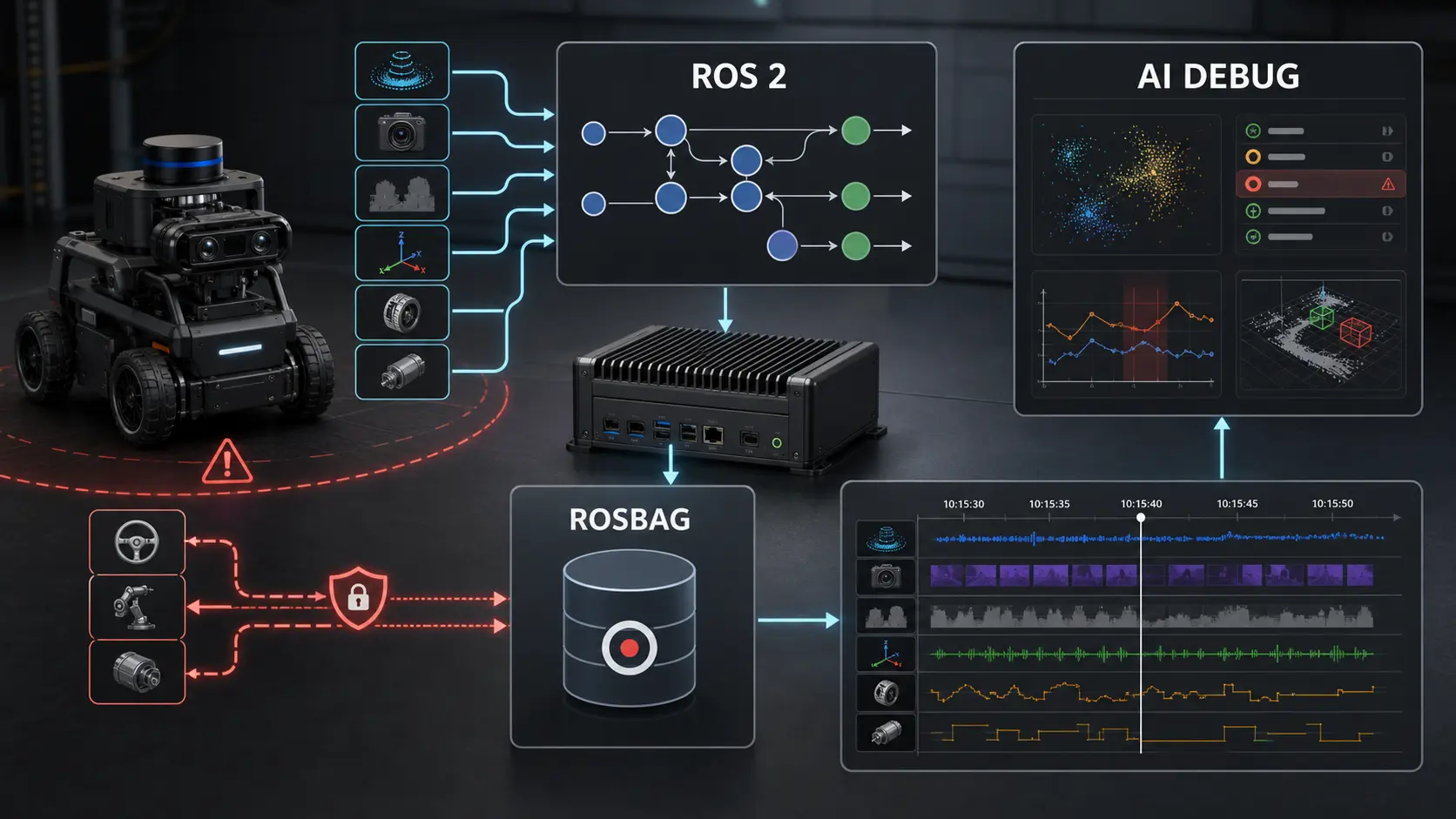
The first time an AI copilot helps you debug a robot, the limiting factor is usually not the model.
It is the data you give it.
A language model can summarize logs, compare events, inspect a rosbag, spot suspicious timing gaps, and propose hypotheses. But it cannot reconstruct a physical failure from vague console output, missing timestamps, unrecorded commands, stale transforms, dropped sensor frames, or a bag that captured camera images but not the safety state that rejected the motion.
AI-assisted robot debugging only works when the robot produces evidence that is structured enough to be replayed, correlated and challenged. The goal is not “log everything.” The goal is to capture the causal chain: what the robot believed, what command it received, what safety envelope was active, what sensors reported, what controller did, and what changed when the failure happened.
This article is the data architecture I would use for a ROS 2 robot that needs human and AI-assisted debugging without giving the AI unsafe authority over the machine.
Key takeaways
- Treat logs,
/rosout, rosbag2 recordings, diagnostics, traces and safety events as one debugging system, not separate artifacts. - A useful rosbag captures causal context: command intent, robot state, sensor confidence, transforms, controller outputs, actuator feedback, safety decisions and timing metadata.
- Use structured event logs for explanations and rosbag2/MCAP for replayable time-series evidence.
- Do not record only the high-bandwidth sensor topics. Record the low-rate supervisory topics that explain why the robot behaved the way it did.
- QoS matters for debugging. A bag that silently misses best-effort sensor data or late-joining state can mislead both engineers and AI tools.
- AI copilots should read logs and propose hypotheses, but command authority should remain inside ROS 2 supervision and real-time controllers.
Citation-ready answer
For AI-assisted ROS 2 debugging, structure data as a correlated evidence bundle: rosbag2 records replayable topic streams, structured logs explain node-level decisions, diagnostics report health and freshness, traces expose latency and callback timing, and safety events capture rejected or degraded commands. The bag should include not only sensors, but also command intent, state estimates, TF, controller outputs, actuator feedback, QoS-sensitive topics, watchdog state and safety-envelope decisions. This gives humans and AI tools enough context to reason about cause and effect without granting the AI direct control over the robot.
The debugging problem is causal, not textual
Most failed robotics demos leave behind three kinds of artifacts:
- A terminal scrollback full of mixed node output.
- A rosbag with some sensor topics.
- A human memory of what “looked wrong.”
That is not enough.
A real robot failure has a time structure. A voice command may arrive at 10:15:31.200. The planner may accept a goal at 10:15:31.420. The localization covariance may spike at 10:15:31.700. A watchdog may see stale wheel odometry at 10:15:31.850. The safety supervisor may clamp velocity at 10:15:31.870. The operator may only notice the robot hesitating at 10:15:32.
If your logs and bags do not preserve that sequence, the incident becomes a story instead of evidence.
This matters even more when an AI assistant is part of the workflow. The model needs grounded artifacts. It should not infer missing robot state from prose. It should inspect a bounded dataset and answer questions like:
- Which command changed the robot mode?
- Was the command validated or rejected?
- Were the relevant sensor topics fresh at that moment?
- Did TF have the frame required by the planner?
- Did the controller receive a goal before the actuator feedback changed?
- Was the stop caused by a safety envelope, a watchdog timeout, a QoS mismatch or a perception confidence drop?
That is the difference between AI-assisted debugging and AI-flavored guessing.
For broader architecture context, this sits underneath ROS 2 architecture patterns that scale and beside the safety model in robot safety architecture.
A reference evidence stack for ROS 2 robots
Think of debugging data as five layers.
| Layer | Artifact | Captures | Best use |
|---|---|---|---|
| Replay | rosbag2 / MCAP | Topics, services, actions, timestamps, message data | Reproduce sensor/state/command sequences |
| Explanation | Structured logs and /rosout | Node decisions, validation failures, state transitions | Understand why software chose an action |
| Health | diagnostics and heartbeat topics | Liveness, freshness, degraded mode, hardware status | Detect stale or unhealthy components |
| Timing | traces and topic statistics | Callback duration, latency, jitter, queue behavior | Prove timing and scheduling failures |
| Safety | safety event topics and audit logs | Rejected commands, watchdog trips, envelope changes | Explain why authority was limited |
ROS 2 already provides much of the foundation. The official ROS 2 logging docs describe configurable logging directories, logger levels and output formatting. rosbag2 provides command-line and API workflows for recording and replaying data, including bags created from your own nodes. ROS 2 tracing exists for callback and performance analysis. QoS documentation explains why reliability, durability, depth, deadline and liveliness settings affect whether data is delivered at all.
The missing piece is usually not tooling. It is a recording contract.
The minimum useful debug bundle
For a robot that moves in the real world, I would not call a debug capture complete unless it includes these topic families.
| Topic family | Examples | Why it matters |
|---|---|---|
| Operator and AI intent | /mission/intent, /voice/transcript, /agent/tool_request, /operator/command | Shows what the system was asked to do |
| Validated commands | /cmd_vel_safe, /arm/goal_safe, /supervisor/accepted_goal | Separates proposed action from authorized action |
| Raw commands before validation | /cmd_vel_raw, /agent/proposed_goal | Reveals unsafe or malformed requests |
| Robot state | /odom, /joint_states, /robot_state, /mode | Shows what the robot believed about itself |
| Sensor confidence | /perception/confidence, /localization/status, covariance fields | Prevents treating weak perception as ground truth |
| TF and calibration state | /tf, /tf_static, calibration/version topics | Explains frame and coordinate failures |
| Controller outputs | controller command topics, trajectory feedback, action feedback | Shows what control layer attempted |
| Actuator feedback | motor state, encoder feedback, current, temperature | Shows what hardware actually did |
| Safety state | /safety/events, /watchdog/status, /estop/state, /degraded_mode | Explains stops, clamps and rejected commands |
| Diagnostics | /diagnostics, node heartbeat, hardware health | Correlates failures with component health |
Notice what is not first on the list: camera frames.
Images, point clouds and LiDAR scans matter, but they are often not the causal explanation. A 200 GB bag of camera data without mode transitions, safety events, command validation and actuator feedback is expensive confusion.
Design structured logs for machines, not terminals
Human-readable logs are useful during development. They are not enough for incident analysis.
A good robot log line should preserve enough structure that a script, dashboard or local AI assistant can filter it without guessing. At minimum, log events should carry:
| Field | Example | Why it matters |
|---|---|---|
event_type | command_rejected | Makes filtering reliable |
node | safety_supervisor | Identifies ownership |
robot_time | 18342.481 | Correlates with bag playback |
wall_time | ISO timestamp | Correlates with operator reports |
trace_id | mission_42.step_7 | Groups multi-node events |
mode | autonomous_inspection | Explains active authority |
input_ref | agent_tool_call_018 | Links decision to command source |
reason_code | STALE_ODOM | Avoids natural-language ambiguity |
measured_value | odom_age_ms=280 | Makes thresholds auditable |
threshold | max_odom_age_ms=150 | Shows the rule that fired |
action_taken | velocity_clamped_to_zero | Shows the resulting behavior |
That can still be emitted through normal ROS 2 logging. The difference is discipline.
For example:
1 | event_type=command_rejected node=safety_supervisor trace_id=mission_42.step_7 robot_time=18342.481 mode=autonomous_inspection input_ref=agent_tool_call_018 reason_code=STALE_ODOM odom_age_ms=280 max_odom_age_ms=150 action_taken=velocity_clamped_to_zero |
Do not bury the important fields in prose like “looks like odom is a little old so stopping maybe.” That sentence is readable but weak evidence.
The ROS 2 logging system supports logger levels, throttled logs, log directory configuration and output formatting. Use that, but do not confuse log transport with log design.
What belongs in the bag and what belongs in logs
Use this decision matrix.
| Data type | Put in rosbag2 | Put in structured logs | Reason |
|---|---|---|---|
| Sensor samples | Yes | Rarely | Needs replay and time alignment |
| TF | Yes | Only errors | Spatial bugs need replayable transforms |
| State estimates | Yes | Key transitions | Replay shows drift, logs show decisions |
| Controller commands | Yes | Rejections and mode changes | Replay proves command timing |
| Actuator feedback | Yes | Faults and limits | Hardware behavior must be correlated |
| AI tool calls | Summary topic yes | Full structured audit yes | Needs auditability and privacy control |
| Safety envelope changes | Yes | Yes | Safety decisions must be replayable and explainable |
| High-volume debug images | Sometimes | No | Record selectively to avoid drowning the incident |
| Stack traces | No | Yes | Text artifact, not time-series robot state |
| Callback duration traces | Separate trace | Summary logs | Tracing tools are better than forcing this into bags |
The common mistake is recording only replay data and not explanation data. A bag can tell you that /cmd_vel_safe became zero. It may not tell you why.
The opposite mistake is writing verbose logs without recording the physical state. A log can say “planner succeeded.” It cannot prove whether the robot had fresh TF, valid odometry or actuator response at the same instant.
You need both.
A practical recording profile
On a Jetson-based robot or any edge compute box, recording everything all the time can hurt the robot. Storage bandwidth, CPU compression, thermal limits and GPU workloads all compete with autonomy.
Use recording modes.
| Mode | Trigger | What to record | Retention |
|---|---|---|---|
| Always-on black box | Robot enabled | Low-rate state, commands, safety, diagnostics, selected TF | Rolling 10-30 minutes |
| Incident burst | Fault, E-stop, watchdog, operator bookmark | Full relevant sensors plus black-box topics | Keep until triaged |
| Experiment run | Lab test or benchmark | Explicit topic list with metadata | Keep with test notes |
| Timing investigation | Jitter or latency issue | rosbag plus ros2_tracing session | Keep until root cause confirmed |
| Dataset capture | ML/perception work | Sensor-heavy topics, labels, calibration metadata | Versioned dataset storage |
For many robots, the always-on black box is the highest-leverage change. It should be boring and cheap: command topics, safe command topics, robot state, diagnostics, safety events, TF, mode, heartbeat and a few low-rate perception confidence signals. Then you trigger a heavier incident capture only when something interesting happens.
This pattern pairs well with the authority split described in how to split authority between an LLM, ROS 2 and a microcontroller. The LLM can help inspect evidence, but the supervisor decides when capture starts and what command authority is allowed.
Use MCAP and storage settings intentionally
rosbag2 supports storage plugins. The rosbag2 repository documents storage plugin architecture and notes MCAP support through rosbag2_storage_mcap, including storage configuration files and plugin-specific compression behavior. In practice, MCAP is a strong default for modern ROS 2 debug bundles because it is designed for indexed robotics logs and tooling interoperability.
That does not mean “turn on every compression option and forget it.”
On constrained edge hardware, make the storage decision explicit:
| Constraint | Prefer | Watch out for |
|---|---|---|
| High write throughput | MCAP fast-write style settings or low compression | Post-process for indexing and storage efficiency |
| Long-term analysis | Indexed MCAP with metadata | More CPU/storage overhead during capture |
| CPU-constrained Jetson | Lower compression during motion | Compression can steal cycles from perception |
| Network upload later | Post-run compression | Do not compress in the control path if it affects timing |
| AI-assisted offline review | Indexable files and metadata | A bag without topic names, types and timing is weak evidence |
The right answer depends on the robot. A warehouse robot, lab manipulator and mobile research platform do not have the same storage, bandwidth or incident-retention constraints.
QoS can make your debug data lie
ROS 2 QoS is not a footnote. It changes what data exists.
The ROS 2 QoS documentation explains policies such as history, depth, reliability, durability, deadline, lifespan and liveliness. The rosbag2 QoS override guide also points out that reliability and durability affect compatibility when recording and playing back data.
That matters because a debugging bag is only credible if it captured what you think it captured.
Common failure modes:
| Failure mode | Symptom | Debug consequence | Fix |
|---|---|---|---|
| Recorder QoS incompatible with publisher | Topic missing from bag | AI and humans analyze an incomplete incident | Use rosbag2 QoS overrides |
| Best-effort sensor drops under load | Bag shows gaps | Failure looks like perception logic instead of transport/load | Record drop metrics and topic statistics |
| Queue depth too small | Bursty topics lose context | Fast events disappear around the incident | Tune depth for bursty signals |
| Volatile state topic | Late recorder misses initial state | Playback starts without mode/config context | Publish latched-equivalent state where appropriate |
| Deadline violations not logged | Timing failure looks like planner failure | Root cause moves to wrong layer | Add deadline/liveliness events or diagnostics |
If the robot is important enough to debug, it is important enough to test the recorder itself.
Add a safety event topic
For AI-enabled robots, I like an explicit safety event stream.
Example message fields:
1 | stamp: builtin_interfaces/Time |
This is not a replacement for a safety-rated controller, E-stop circuit or real-time watchdog. It is an observability contract for the supervisory layer.
When a robot refuses to move, clamps a velocity, exits autonomous mode or requires a human acknowledgment, the event should be visible in the bag and in structured logs. That keeps safety behavior explainable without weakening safety authority.
This connects directly to why LLMs should not control motors and robots and to the real-time separation described in real-time Linux for robotics.
The AI copilot contract
An AI debugging assistant should have read authority, not motion authority.
Give it tools like:
list_topics(bag_id)summarize_topic(topic, start, end)find_events(reason_code, time_window)compare_command_to_feedback(command_topic, feedback_topic)check_freshness(topic, max_age_ms)inspect_safety_events(trace_id)extract_timeline(start, end)
Do not give it tools like:
publish_cmd_velset_gpioclear_estopchange_safety_modewrite_motor_pwm
The AI can produce a hypothesis, a timeline and a recommended next test. A human or a bounded supervisory node decides what happens to the real system.
That boundary is especially important on a local robot brain running on Jetson, where the LLM, ROS 2 graph and hardware interfaces may all live on the same edge device.
A debug prompt that actually works
If you are using a local or cloud AI assistant to inspect a bundle, do not paste random logs and ask “what happened?”
Give it a bounded task:
1 | You are analyzing a ROS 2 robot incident. |
This forces the model to behave like an incident assistant instead of a robot operator.
Troubleshooting checklist
Before trusting a debug bundle, check the bundle itself.
- Does the bag include both proposed commands and validated commands?
- Does it include safety events and watchdog state?
- Are
/tfand/tf_staticpresent when spatial behavior matters? - Are mode transitions recorded?
- Are diagnostics and heartbeat topics present?
- Are topic timestamps using a consistent time base?
- Is the recorder QoS compatible with the publishers?
- Are high-rate topics sampled intentionally rather than accidentally?
- Can the bag be replayed on another machine?
- Can you locate the first bad event without reading every log line manually?
- Is there enough metadata to know software version, robot ID, calibration version and launch profile?
- Are AI tool calls linked to trace IDs and safety decisions?
If the answer is no, fix instrumentation before collecting more data.
Failure taxonomy for AI-assisted robot debugging
| Category | Typical evidence | What the AI can help with |
|---|---|---|
| Stale data | Sensor age, missed heartbeat, deadline violation | Find first stale topic and affected downstream nodes |
| Frame error | Missing TF, wrong optical frame, calibration mismatch | Compare timestamps and required frame chain |
| Command validation | Rejected goal, clamped velocity, invalid mode | Explain rule fired and command source |
| Controller mismatch | Goal accepted but actuator feedback diverges | Compare command, controller output and feedback |
| Perception confidence drop | Low confidence, covariance spike, detector instability | Correlate perception quality with behavior change |
| QoS or transport loss | Missing samples, incompatible QoS, burst drops | Identify recording blind spots and network symptoms |
| Real-time overload | Callback latency, jitter, CPU thermal throttling | Summarize timing evidence from traces |
| Safety intervention | Watchdog, E-stop, degraded mode | Build timeline around safety event |
This is where sensor fusion debugging benefits from better evidence. Drift is often not one bad sensor. It is a timing, confidence, calibration and fusion-state problem that needs correlated logs and bags.
Recommended source references
These are the technical references I would keep close when designing this system:
- ROS 2 Kilted logging and logger configuration
- ROS 2 Kilted recording a bag from a C++ node
- rosbag2 QoS overrides for recording and playback
- ROS 2 Kilted Quality of Service settings
- ROS 2 tracing tutorial
- rosbag2 repository and storage plugin notes
FAQ
Should I record all ROS 2 topics for AI debugging?
No. Record enough to reconstruct causality. Always capture commands, validated commands, state, diagnostics, safety events, relevant TF and selected sensor streams. Add full high-bandwidth sensors only for incidents, experiments or perception work where that data is needed.
Is /rosout enough?
No. /rosout is useful, but it should not be your only evidence layer. Use structured logs for decisions, rosbag2 for replayable topic data, diagnostics for health and tracing for timing.
Should an AI assistant read raw rosbags directly?
Only through bounded tools. A good workflow extracts topic lists, time windows, message summaries, safety events and statistics. The assistant should not need unrestricted access to every byte of sensor data to produce a useful incident timeline.
What is the most important topic people forget to record?
The safety and supervision topics. Engineers often record camera, LiDAR and odometry, then forget the mode, watchdog, command validation and safety-envelope decisions that explain why the robot stopped or refused a command.
Do I need ros2_tracing for every robot?
Not always. Use tracing when the suspected failure involves latency, jitter, callback duration, scheduling or executor behavior. For normal incident review, logs, diagnostics and a well-designed rosbag are often enough.
Can this run on a Jetson?
Yes, but be intentional. Keep an always-on low-bandwidth black-box recorder, trigger heavier incident captures only when needed, and avoid compression or high-rate recording settings that steal resources from perception and control.